🏟️ At the Courts
The post by the courts shows what's happening right now — which level is playing on each court and how many players are out there. Here's how to read it, and how to add yourself.
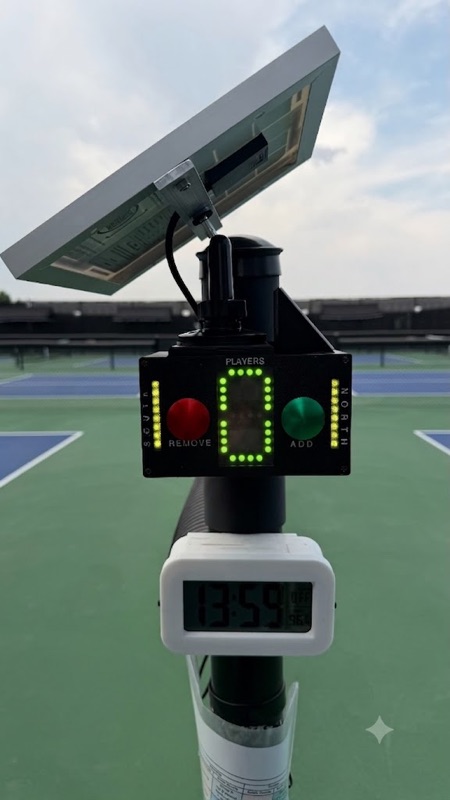
The green & red buttons
This count is for mornings when you want to know if anybody is playing — or planning to play.
Press green when you start playing. The number on the display goes up by one.
Press red when you leave. The number goes down by one.
You don't have to tap yourself out. The count clears on its own about 2 hours after the last person was added, so it always settles back to zero on a quiet evening. If you'd like to correct it sooner, anyone can press red to take it down, or hold the red button for about 2 seconds to zero it. Because it clears itself, treat the number as a sense of recent activity rather than an exact head count.
🌬️ Live wind, measured here
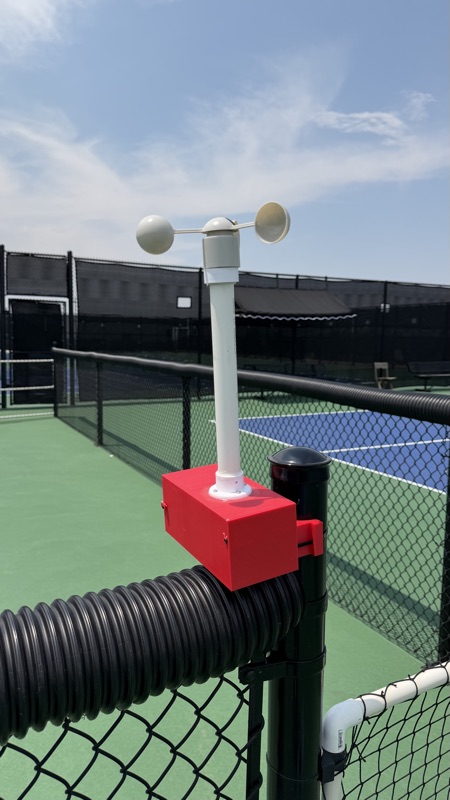
The wind shown on the website comes from our own sensor mounted right at the courts — not a distant airport reading. It reports the real on-court wind speed and gusts, so you (and anyone checking from home) can tell a calm evening from a blustery one before heading out.
It runs 24/7 on a battery, sending a fresh reading every minute. Wind speed is averaged over each minute; gusts are the peak wind speed during that minute.
This same reading shows up on the Home page's Conditions card, where it also feeds the 🟢 Great / 🟡 Playable / 🔴 Tough call — a stiff sustained wind or gust nudges that rating down before you've even left the house.
✅ Add yourself
Here to play? Add yourself so others can see the courts are filling up. This puts you on the home-page player count and bumps the courtside display automatically — the post and this site stay in sync, refreshing about once a minute. (So you don't need to also press green.)
What the colors mean
Each light strip is one court — the left strip is South, the right strip is North. The color shows what's scheduled on that court right now.
The level colors (red / blue / green) stay solid. Open Play and Reserved gently pulse so they stand out. Reserved beats everything — a booked court shows orange no matter what the weekly schedule says.
The number display
The display shows how many players are on the courts right now. A single digit covers 0–9; once you reach 10 or more, two small dots above the digit count the tens (one dot = 10s, two dots = 20s) — so a busy evening of 14 reads as one dot and a "4". It goes up when someone presses green and down when someone presses red. The color tells you at a glance how busy it is:
🛠️ See something broken? Report it
Nets, wind screens, canopies, gates, the scoreboard — if something's damaged or not working, let us know so we can fix it. Snap a photo, pick what it is, add a quick note, and it goes straight to the club maintainers. Takes about 20 seconds.
📸 Report a court problem